
If you’ve been following the AI revolution, you’ve probably heard that data centers are literally running hot. Like, melt-your-servers hot. Modern AI processors can pull 1,000 watts each, and when you pack dozens of them into a single rack, you’re looking at heat loads that would make a blast furnace blush.
Traditional air conditioning simply can’t keep up anymore. That’s why the industry is making a dramatic shift to liquid cooling—and not just any liquid cooling, but three distinct approaches that each solve different problems. Let’s break down what’s actually happening in these next-generation facilities.
The Physics Problem That Changed Everything
Here’s the thing about cooling: liquids are just better at it than air. Not a little better—dramatically better. Water can absorb 15-25 times more heat than air per unit volume, and it can carry that heat away much more efficiently.
When you’re trying to cool a rack pulling 80-100 kilowatts (that’s roughly what 60 homes use simultaneously), air cooling becomes almost comically inefficient. You’re essentially trying to cool a bonfire with a desk fan. The industry needed a reset, and liquid cooling provided three different answers.
Option 1: Direct-to-Chip Cooling (The Surgical Approach)
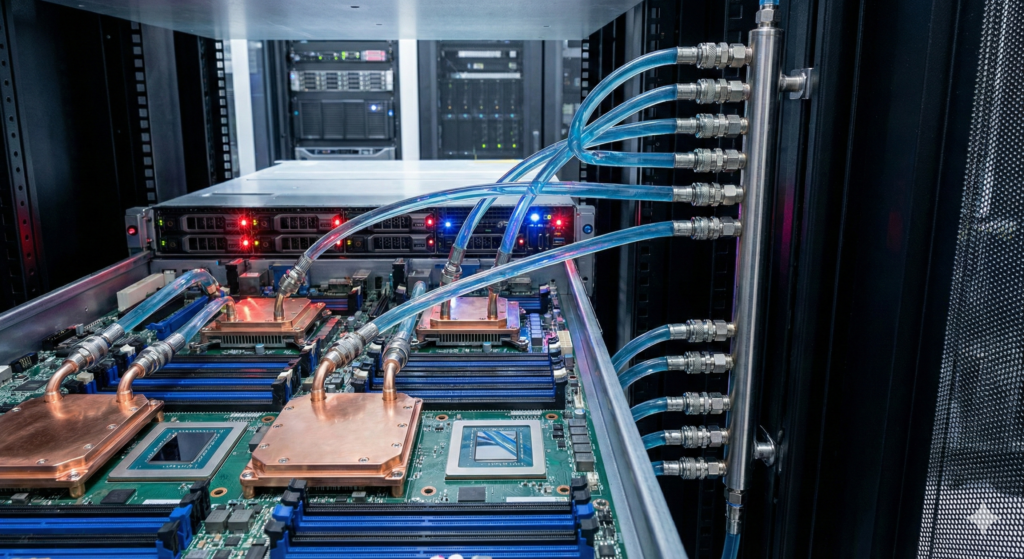
Think of direct-to-chip cooling like having a dedicated cooling system for just your engine block, not your entire car. Cold plates mount directly onto your GPUs and CPUs, circulating coolant right where the heat is generated.
How it works: Liquid flows through specialized plates bolted onto your processors. The heat transfers into the liquid, which gets pumped back to a cooling distribution unit, cooled down, and sent back for another lap.
The upside: This is the least disruptive approach. You can retrofit existing servers, it works with standard rack layouts, and you’re using familiar water-based cooling principles that data center operators already understand. Companies like Asetek and CoolIT Systems have proven systems with millions of deployment hours.
The downside: You’re only cooling the hottest components. Everything else—drives, power supplies, network cards—still needs air cooling. It’s a hybrid approach, which means you can’t eliminate air handlers entirely. And if a connection fails and water hits live electronics? That’s a very bad day.
Best for: Existing data centers upgrading gradually, or facilities that need to cool specific high-power components without completely redesigning their infrastructure.
Option 2: Immersion Cooling (The Full Commitment)
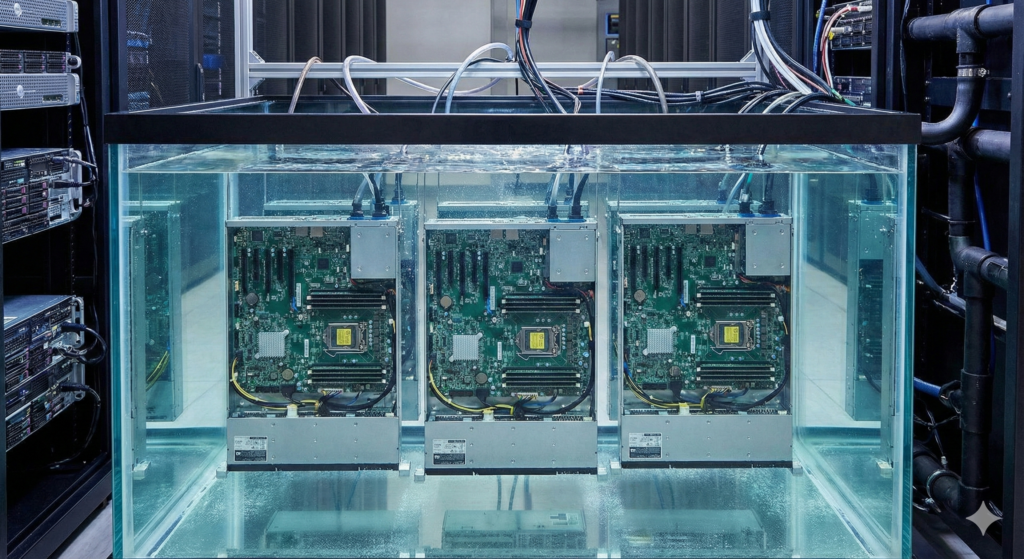
Now we’re getting radical. Immersion cooling means exactly what it sounds like: you submerge entire servers in tanks of specialized coolant fluid. No air cooling at all.
How it works: Servers sit in tanks filled with dielectric fluid (which conducts heat but not electricity). The fluid absorbs heat from every component simultaneously—processors, memory, storage, everything. The warmed fluid either gets pumped to a heat exchanger or naturally evaporates and condenses in a closed loop.
Companies like GRC (Green Revolution Cooling) and LiquidStack have turned this from science fiction into production reality. Microsoft, Oracle, and Crusoe Energy are running massive deployments right now.
The upside: This is the most energy-efficient approach available. We’re talking about Power Usage Effectiveness (PUE) values below 1.1—meaning almost all your electricity goes to computing, not cooling. You can pack incredible density into a small footprint. And you eliminate virtually all cooling infrastructure: no air handlers, no raised floors, no hot/cold aisles.
The downside: It’s a complete architectural departure. You need custom server designs, special tanks, handling procedures for the coolant. Maintenance means fishing servers out of fluid. The fluid itself costs thousands of dollars per tank, and you need to manage it carefully. This isn’t something you retrofit—it’s something you build from scratch.
Best for: New builds optimized for AI workloads, edge deployments where space is limited, or facilities targeting maximum energy efficiency and density. This is what we’re deploying at AIPlant because it aligns with our strategy for high-density AI infrastructure.
Option 3: Rear Door Heat Exchangers (The Retrofit Special)
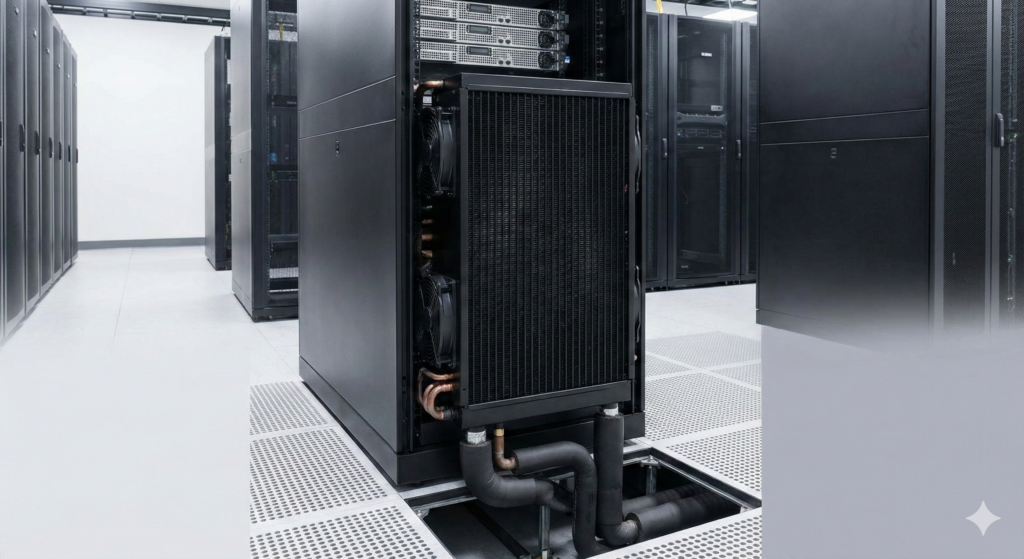
This is the “diet liquid cooling” option—you add cooling capacity without redesigning your entire data center.
How it works: Instead of a normal perforated rear door on your server racks, you install a door with a built-in heat exchanger. Air exits the hot rear of your servers, passes through the heat exchanger (which has coolant running through it), and the cooled air continues into the room.
The upside: This is by far the easiest retrofit. You keep your existing servers, existing racks, existing air cooling design—you just swap the doors. Companies like Vertiv and Motivair offer systems that can handle 35-45 kilowatts per rack. Installation takes hours, not months.
The downside: You’re still fundamentally air cooling your servers—you’re just making that air cooling more efficient by capturing heat at the rack level. You can’t achieve the density or efficiency of true liquid cooling solutions. It’s a band-aid, not a transformation.
Best for: Existing facilities that need to increase capacity without major construction, or as a bridge technology while planning a larger liquid cooling deployment.
The Real Question: Which Approach Makes Sense?
Here’s the honest answer: it depends entirely on your situation.
If you’re retrofitting an existing facility and need to handle higher power densities without massive construction projects, direct-to-chip or rear door heat exchangers make sense. They’re less disruptive and work within your existing infrastructure.
If you’re building new infrastructure for AI workloads, immersion cooling deserves serious consideration. Yes, it requires rethinking your approach. But the energy savings alone—we’re talking about reducing cooling costs by 45-50%—can justify the transition over a multi-year horizon.
The economics shift dramatically when you factor in electricity costs, space constraints, and the trajectory of chip power consumption. When NVIDIA’s next generation of GPUs reportedly hits 1,500-2,000 watts per chip, air cooling isn’t just inefficient—it becomes physically impossible at scale.
What’s Happening in the Market Right Now
The adoption curve is steep. DCD Intelligence projects the liquid cooling market will hit $15 billion by 2028, driven primarily by AI infrastructure buildouts. Meta is deploying direct-to-chip cooling at scale. Oracle is building immersion-cooled facilities. Microsoft is testing both approaches across different use cases.
The question isn’t whether liquid cooling will dominate AI data centers—it’s which variant will capture what share of the market.
For AIPlant, we’ve bet on immersion cooling for our Northern Arizona facility because the economics align with our strategy: maximize density, minimize operating costs, and position ourselves as liquid cooling specialists in a market where expertise is scarce.
The Bottom Line
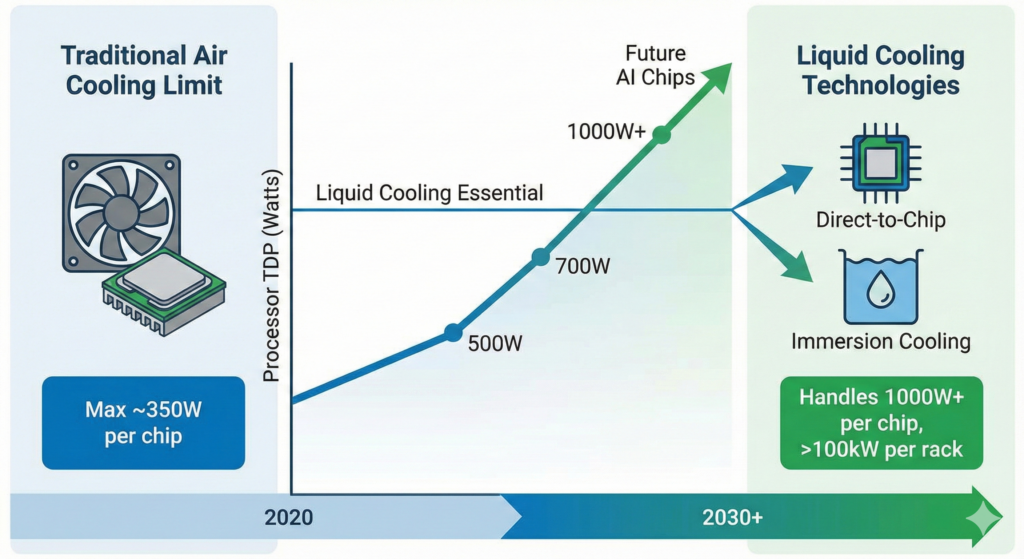
Air cooling served us well for decades, but physics doesn’t negotiate. As AI workloads continue pushing power density higher, liquid cooling transitions from “nice to have” to “table stakes.”
The three approaches—direct-to-chip, immersion, and rear door heat exchangers—each solve different problems. Your choice depends on whether you’re retrofitting or building new, your target power density, your operational expertise, and your willingness to embrace architectural change.
The data center industry is in the middle of its biggest infrastructure transition since the shift from mainframes to distributed computing. Understanding these cooling technologies isn’t just technical knowledge—it’s strategic positioning for the AI era.
Want to learn more about how liquid cooling enables next-generation AI infrastructure? Contact us to discuss how these technologies could work for your deployment, or check out out the following resources for deeper dives into specific implementations.
Key Resources: